The Rayrun Matter Bridge MTB10 is a Casambi Ecosystem device designed to integrate Casambi lighting networks to Matter smart-home ecosystems such as :
- Apple Home, including Siri
- Google Home, including Google Assistant
- Amazon Alexa
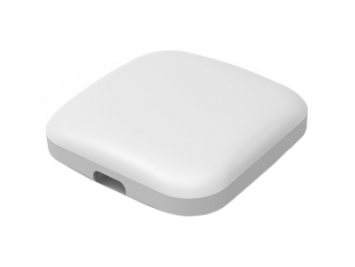
This device is USB-C powered and enables Matter compatibility without the need for custom drivers or local cloud integrations.
How it works
Casambi BLE Mesh Network
- Lighting devices are commissioned and controlled via the Casambi App using Bluetooth.
- Casambi remains the source of the network configuration (groups, scenes, profiles).
MTB10 Bridge Function
- Listens to the Casambi network and mirrors appropriate lighting states to Matter.
- Translates control commands from Matter controllers into Casambi actions.
Matter Control
- A Matter controller (e.g., Apple Homepod) sees imported devices.
- Users can control lights via the controller or voice assistants. Scenes can be created for group controls and presets.
Setup and Configuration
Hardware Setup
- USB Type-C Power Input
- Connect to a standard USB power supply (not included) using the provided USB cable. The power source must deliver a stable 5 V / 1A DC output.
- Status Indicator
- A status indicator will light up with green, yellow or red colour. The different indicator colour displays working status as below:
- Green: Normal operation.
- Yellow: Not connected to Matter.
- Red: Matter reset in progress.
- A status indicator will light up with green, yellow or red colour. The different indicator colour displays working status as below:
Setup Guide
- Add the MTB10 to a Casambi network
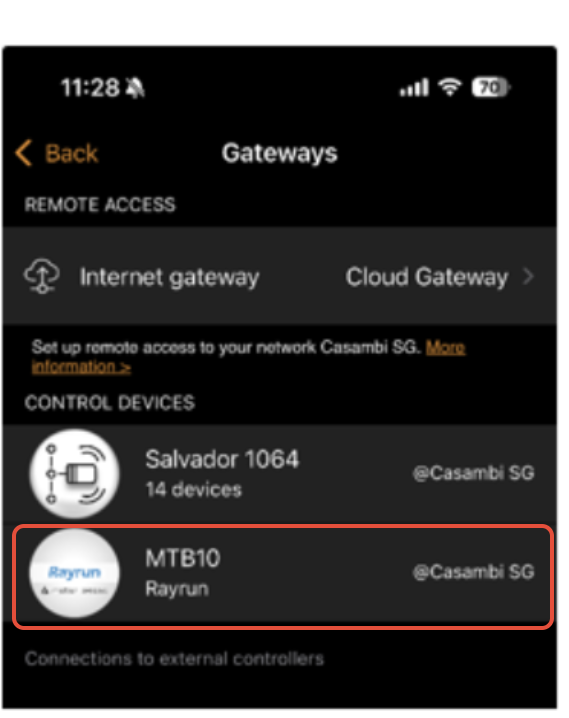
- Use the Casambi app to add the MTB10 as a gateway device, just like any other Casambi node. Once added, it will appear in the Gateway section of your network settings.
- Use the Casambi app to add the MTB10 as a gateway device, just like any other Casambi node. Once added, it will appear in the Gateway section of your network settings.
- The MTB10 will automatically map all compatible Casambi devices in the network to Matter—no further action is required within Casambi.
- Pair with a third-party ecosystem (Matter Setup)
- Your smartphone is connected to a 2.4 GHz Wi-Fi network. The MTB10 is only compatible with a 2.4GHz Wi-Fi network.
- Set up your Matter-compatible smart speaker or hub (e.g., HomePod, Nest Hub, or Echo) with your smart phone on the same 2.4GHz wifi network to act as a Matter controller.
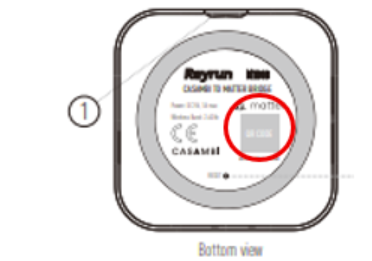
- Open your smart home app (e.g., Apple’s Home, Google Home, or Amazon Alexa), select “Add Accessory,” and scan the QR code on the MTB10’s label.
- For optimal performance, install the MTB10 in a location with strong Wi-Fi and Casambi signal coverage.
- Complete integration
- Once the smart home app is opened, the MTB10 will begin mapping Casambi devices into the new ecosystem.
- You will observe the luminaires and sensors populate the main devices page of your smart home app.
- The time taken for the import process is proportionate to the number of nodes of the Casambi network.
- Proceed to identify and name your devices accordingly based on the instructions given on your smart home app.

* Please note:
- Device names, groups, and scenes defined in Casambi are not transferred. You’ll need to reassign names and room locations on the smart home platform. Scenes where desired will need to be programmed on the smart home app.
- Automations and scenes must be recreated in the target ecosystem. While Casambi and Matter automations can run in parallel, conflicting commands should be avoided.
- Casambi network pairing for the MTB10 persists after a Matter reset. To fully remove the network, please unpair the MTB10 from the Casambi app.
Limitations and Known Behaviours
The following limitations and device behaviours are important when planning and commissioning lighting systems:
- 150-Device Import Limit
- The bridge will import up to 150 Casambi devices per Casambi network.
- If more than 150 devices are present, only the first 150 discovered/imported will be exposed to Matter.
- Battery-Powered Devices Not Imported
- Battery-powered Casambi devices (e.g., wireless sensors and switches) will NOT be imported to Matter.
- Dual-Purpose Devices
- Devices that combine multiple functions (for example, a luminaire controller and a sensor in one unit) may be presented in Matter as two separate devices.
- This will be considered within the 150 devices limit of the Matter bridge.
Support & Documentation
- For more information on the product: Refer to their product page: (https://www.rayruntech.com/product/showproduct.php?id=821).